As more schools work to consolidate the student research procurement process within the university bookstore, StockTrak is proud to announce that our portfolio simulation is now available through two new distribution partners: Kortext and VitalSource.
StockTrak is now available for digital access through most university bookstores. Through our integrations with VitalSource and Kortext, all StockTrak service levels can be ordered through the vast majority of university bookstores across North America and many institutions worldwide. If your bookstore is managed by VitalSource, Kortext, Barnes & Noble College, or Follett, StockTrak is available for adoption. Contact your bookstore manager to order StockTrak for your upcoming courses.
Schools who utilize these platforms can now have students purchase their StockTrak license through the school’s unified bookstore.
How To Use StockTrak through Bookstore Vendors
Before your students can purchase their StockTrak license, professors must create a class. If you do not already have your free professor account, please click here to register.
Once you log in, create your class with your preferred settings. You can find our Class Creation help by clicking here, or click here to schedule a meeting with one of our Account Managers to walk through the process and all relevant settings for your class.
When creating your class, select the “Bookstore” textbook option that matches your chosen StockTrak service level. This ensures the correct bookstore coupon codes are available for student registration.
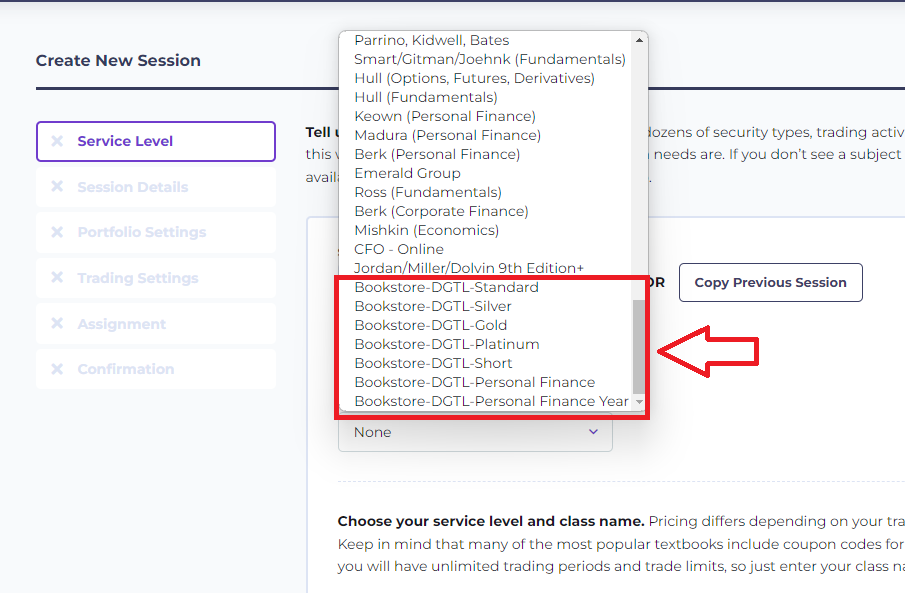
Once selected, specify that your class is for “Student” payment, and choose all of your other preferred settings.
Finally, from your Kortext or VitalSource professor portal, add “StockTrak Portfolio Simulation” as a resource for your class, with the same service level chosen when creating your class on StockTrak.com.
Student Registration
Once your class is set up on StockTrak.com and StockTrak has been added as a class resource in your digital bookstore, students can purchase it through your school’s online portal.
When students purchase their StockTrak account through the digital bookstore, it will give them a 10-digit “Coupon Code”. From here, share the Registration Link for your class that was sent to you by email (and can also be found on your Registration File report).
Students simply need to enter their 10-digit coupon code while creating their StockTrak student profile, and they will be added to your class.
StockTrak ISBN Numbers (International Standard Book Numbers)
Stocktrak.com STANDARD – 9 Week Access – 9781647747237
Stocktrak.com SILVER – 14 Week Access – 9781647747244
Stocktrak.com GOLD – 18 Week Access – 9781647747251
Stocktrak.com PLATINUM – 36 Week Access- 9781647747268
Stocktrak.com SHORT – 7 Week Access- 9781647747275
Stocktrak.com PERSONAL FINANCE – Year Access – 9781647747282
Stocktrak.com PERSONAL FINANCE – Semester Access – 9781647747299
If you have any questions or concerns, please do not hesitate to reach out to our support team at support@stocktrak.com!
-The StockTrak Team